

Overview
The Co-branded Reports API creates MapView PDF reports that carry your organisation’s branding. Send an Australian address or a suburb, and MapView produces a report with:
- your logo on the cover, on interior page headers and in every footer
- your display name and a footer strapline
- a named contact person on the cover and in every footer
- MapView attribution, which stays in every footer.
There are two report types:
| Type | reportType | You send |
|---|---|---|
| Property report | 2 | A validated Australian property address, with an optional unit |
| Suburb report | 3 | A suburb, state and postcode, and a region for Queensland |
Reports are made asynchronously. You create a job, then poll it or receive a signed webhook when it’s ready. The finished PDF is downloaded through an authenticated endpoint.
Base URL
https://api.mapview.ai/api/v1/cobrandedThe machine-readable OpenAPI description is at api.mapview.ai/docs (JSON).
Don’t want to build an integration? Your team can create the same reports in the MapView partner portal without writing code.
Before you start
Co-branded reports are free. Where online sign-up is available, sign up and confirm your email: your API key appears straight away, and you can add your branding on the same page. Otherwise, get in touch and we’ll arrange:
- An organisation with a free monthly report quota.
- An API key. It starts with
mv_live_and is shown to you once. Store it in your secret manager straight away. - Your branding. This covers your logo, display name, footer strapline and contact person. See Branding.
- A webhook endpoint, if you want push notifications. This is optional. See Webhooks.
- A test organisation, if you want one. It runs on the production API and uses its own quota.
Quickstart
Four calls take you from an address to a PDF. Each needs your key in the Authorization header.
1. Check the address
curl -sS -X POST https://api.mapview.ai/api/v1/cobranded/addresses/resolve \
  -H "Authorization: Bearer $MAPVIEW_PARTNER_KEY" \
  -H "Content-Type: application/json" \
  -d '{"address":"19 Gresford Road, Wantirna VIC 3152"}'
2. Create the report
curl -sS -X POST https://api.mapview.ai/api/v1/cobranded/property-reports \
  -H "Authorization: Bearer $MAPVIEW_PARTNER_KEY" \
  -H "Content-Type: application/json" \
  -H "Idempotency-Key: $(uuidgen)" \
  -d '{"address":"19 GRESFORD ROAD, WANTIRNA VIC 3152","externalReference":"crm-12345"}'
The response is 202 Accepted with a report id and "status": "queued".
3. Poll until it’s ready
curl -sS https://api.mapview.ai/api/v1/cobranded/reports/$REPORT_ID \
  -H "Authorization: Bearer $MAPVIEW_PARTNER_KEY"
4. Download the PDF
curl -sS https://api.mapview.ai/api/v1/cobranded/reports/$REPORT_ID/pdf \
  -H "Authorization: Bearer $MAPVIEW_PARTNER_KEY" \
  -o report.pdf
Authentication
Every partner endpoint takes your key as a bearer token:
Authorization: Bearer mv_live_...Each key belongs to one organisation and carries the reports:read and reports:write scopes. Every report, PDF, delivery and usage call is restricted to that organisation automatically. A report ID that belongs to another organisation returns 404 not_found.
You can have more than one key, for example one for production and one for CI. A revoked key fails immediately with 401 unauthorized. Ask us to issue or revoke keys.
Keep the key on your server
The key is a long-lived secret. Never put it anywhere a user can read it. That rules out:
- browser JavaScript
- a mobile app bundle
- an iframe or link URL
- local storage, cookies or analytics
- a public repository.
If people use your integration from a web page, have the page call your own backend. Your backend adds the key and calls MapView:
Browser (your login / session)
   ↓  your own endpoints, e.g. POST /api/reports/property
Your backend (holds the mv_live_ key)
   ↓  Authorization: Bearer mv_live_...
https://api.mapview.ai/api/v1/cobranded
Return only the fields your page needs. Requests straight from a browser to the partner API aren’t supported: partner origins aren’t allowed by CORS, and there is no browser-safe token in this release.
Report lifecycle
status | Meaning |
|---|---|
queued | Accepted and waiting for a renderer |
generating | The PDF is being produced |
ready | The PDF is available |
failed | Terminal failure. The report’s quota is refunded automatically |
A property report usually takes 30 to 60 seconds, and a suburb report 60 to 120 seconds. Don’t hard-code these times. A render that runs longer than four minutes fails, and jobs that stall are cleaned up within 15 minutes.
brandingApplied
This is null until the report is ready, then true or false.
true: your branding and contact person were applied.false: your branding couldn’t be applied, for example because the logo couldn’t be read, so the standard MapView report was produced. This is still a valid, ready report, not a failure. Show it as “Standard MapView report” rather than as an error.
The report object
Every create, poll and list call returns reports in this shape:
{
  "id": "377400d8-a07f-4cad-ad55-1b3328156bda",
  "status": "queued",
  "reportType": 2,
  "externalReference": "crm-12345",
  "address": "19 GRESFORD ROAD, WANTIRNA VIC 3152",
  "unit": null,
  "suburb": null,
  "state": "VIC",
  "postcode": "3152",
  "regionId": 2,
  "brandingApplied": null,
  "reportUrl": null,
  "pollUrl": "https://api.mapview.ai/api/v1/cobranded/reports/377400d8-a07f-4cad-ad55-1b3328156bda",
  "error": null,
  "createdAt": "2026-10-21T05:15:36.048Z",
  "completedAt": null
}
When it’s ready:
{
  "status": "ready",
  "brandingApplied": true,
  "reportUrl": "https://reports.mapview.ai/cobranded/1/377400d8-a07f-4cad-ad55-1b3328156bda.pdf",
  "error": null,
  "completedAt": "2026-10-21T05:15:45.771Z"
}
When it has failed:
{
  "status": "failed",
  "brandingApplied": null,
  "reportUrl": null,
  "error": { "code": "pdf_unavailable", "message": "Renderer is temporarily unavailable" }
}
reportUrl is set only when status is ready. It’s an unguessable object URL, so treat it as a secret link. Anyone who has it can open the PDF. Within an app that requires a login, download through the PDF endpoint instead.
Addresses
Resolve an address
POST /api/v1/cobranded/addresses/resolveThis checks an address against G-NAF, Australia’s national address register, and returns the canonical address and its region. Resolve every address before you create a property report.
{ "address": "19 Gresford Road, Wantirna VIC 3152", "unit": "11" }If your system already stores G-NAF IDs, send addressId instead of address. This skips geocoding and looks the address up directly:
{ "addressId": "GAQLD160168662", "unit": "11" }A successful response:
{
  "matched": true,
  "match": "exact",
  "address": {
    "formatted": "19 GRESFORD ROAD, WANTIRNA VIC 3152",
    "placeId": "GAVIC...",
    "lat": -37.8,
    "lng": 145.2,
    "unit": "",
    "state": "VIC",
    "postcode": "3152",
    "locality": "WANTIRNA",
    "unitVerified": false
  },
  "regionId": 2,
  "candidates": ["19 GRESFORD ROAD, WANTIRNA VIC 3152"],
  "buildingNameIgnored": false
}
match is one of these values. A match on the street alone (no street number) is rejected with 422 street_only_match.
match | Meaning |
|---|---|
exact | The address matched exactly |
unit_exact | The address and the unit matched exactly |
range | The street number falls within a numbered range, such as 2–8 |
building_only | The building matched, but not the unit |
Before you create the report, show the user address.formatted and the unit so they can confirm them.
Units
Send the unit in its own unit field, not in the address. If the address string also contains a unit, the two must match; otherwise you’ll get 422 unit_conflict. unitVerified says whether the unit was found in G-NAF.
What isn’t supported
PO Boxes, and LEVEL, LOT, REAR and OFF addresses, return 422 unsupported_address_format.
Autocomplete
Address autocomplete isn’t part of the partner API. You can use any autocomplete you like, but always send the chosen address through resolve before you create a report.
When there are several possible matches
postcode_mismatch, ambiguous_address and street_only_match errors include a candidates list. Show the candidates as options, then send the one the user picks back through resolve.
Create a property report
POST /api/v1/cobranded/property-reportsAuthorization: Bearer <key>
Content-Type: application/json
Idempotency-Key: <uuid-v4>{
"address": "19 GRESFORD ROAD, WANTIRNA VIC 3152",
"unit": null,
"externalReference": "crm-12345",
"regionId": 2
}| Field | Required | Notes |
|---|---|---|
address | address or addressId | Free-text Australian address. Ideally the formatted value from resolve |
addressId | address or addressId | G-NAF ID. Skips geocoding |
unit | No | Unit identifier, separate from the address |
regionId | No | Overrides the region. Must belong to the address’s state |
externalReference | No | Your own ID (CRM, listing or job). It’s returned with the report and can be used to look reports up |
callbackUrl | No | An HTTPS webhook URL for this report only. Signed with your organisation’s webhook secret |
The response is 202 Accepted with the report object, plus:
x-quota-remaining: 97Create a suburb report
POST /api/v1/cobranded/suburb-reports{
"suburb": "Noosa Heads",
"state": "QLD",
"postcode": "4567",
"regionId": 33,
"externalReference": "crm-12346"
}suburb,stateand a 4-digitpostcodeare required.stateis one ofNSW,VIC,QLD,WA,SA,TAS,NTorACT.- Queensland requires
regionId. Without it you’ll get422 region_required. - For other states,
regionIdis optional and defaults to the state’s region. regionIdmust belong to the state.
Queensland regions:
regionId | Region |
|---|---|
| 31 | Brisbane |
| 32 | Gold Coast |
| 33 | Sunshine Coast / Noosa |
| 34 | Logan |
| 35 | Moreton |
| 36 | Ipswich |
| 37 | Redland |
Idempotency
Send an Idempotency-Key header with every create request. It’s optional but strongly recommended. Use a UUID, up to 128 characters; empty or longer values are ignored.
If the same key is sent again, the API returns the original report instead of creating a new one. It adds the header below and doesn’t use quota again:
idempotent-replay: true- Use one key for each logical submission, and reuse it when you retry after a timeout or a dropped connection.
- Use a new key when someone deliberately tries again after a report has failed.
Poll for status
GET /api/v1/cobranded/reports/:idThis returns the report object. Responses are Cache-Control: no-store.
- Poll every 2 to 5 seconds while the report is
queuedorgenerating. - Back off to every 10 seconds after about a minute.
- Stop when the status is
readyorfailed.
async function waitForReport(id, { signal } = {}) {
  const started = Date.now();
  for (;;) {
    const res = await fetch(`https://api.mapview.ai/api/v1/cobranded/reports/${id}`, {
      headers: { Authorization: `Bearer ${process.env.MAPVIEW_PARTNER_KEY}` },
      signal,
    });
    if (!res.ok) throw new Error(`poll ${res.status}`);
    const report = await res.json();
    if (report.status === 'ready' || report.status === 'failed') return report;
    const wait = Date.now() - started < 60_000 ? 3_000 : 10_000;
    await new Promise((r) => setTimeout(r, wait));
  }
}
If you receive webhooks, use them as your main signal and keep polling as the fallback.
List reports
GET /api/v1/cobranded/reports?externalReference=crm-12345&limit=50externalReferenceis optional and filters by your own ID.limitdefaults to 50, with a maximum of 200.- Results come newest first. There’s no cursor pagination yet.
externalReferenceisn’t unique: a retried job can produce more than one report with the same reference.
Use this to rebuild a report history screen after a reload, without storing report IDs yourself.
Download the PDF
GET /api/v1/cobranded/reports/:id/pdfThis returns application/pdf with Content-Disposition: attachment.
| Status | Error | Meaning |
|---|---|---|
| 409 | not_ready | The report hasn’t finished. Keep polling |
| 404 | not_found | No such report for your organisation |
| 502 | pdf_unavailable | The stored PDF couldn’t be fetched. Try again |
This endpoint needs your key, so a web page should download through your backend. To show the PDF in the browser, your backend can stream it with an inline disposition:
// Your backend (Node + Express): GET /api/reports/:id/pdf
import { Readable } from 'node:stream';

const upstream = await fetch(`https://api.mapview.ai/api/v1/cobranded/reports/${id}/pdf`, {
  headers: { Authorization: `Bearer ${process.env.MAPVIEW_PARTNER_KEY}` },
});
if (!upstream.ok) return res.status(upstream.status).json(await upstream.json());
res.setHeader('Content-Type', 'application/pdf');
res.setHeader('Content-Disposition', `inline; filename="${reference}.pdf"`);
Readable.fromWeb(upstream.body).pipe(res);
Alternatively, the page can fetch the PDF from your backend and preview it as a blob:
const res = await fetch(`/api/reports/${id}/pdf`, { credentials: 'include' });
if (!res.ok) throw new Error(`PDF ${res.status}`);
iframe.src = URL.createObjectURL(await res.blob());
Don’t point an iframe at a URL that needs your partner key.
Usage and quota
GET /api/v1/cobranded/usage{
"periodStart": "2026-10-01",
"monthlyQuota": 100,
"used": 7,
"remaining": 93,
"addonActive": true
}- The quota period is a calendar month in Brisbane time (
Australia/Brisbane).periodStartis the first day of the period. - Failed reports are refunded automatically.
- Idempotent replays and validation errors don’t use quota.
- When the quota runs out, create requests return
429 quota_exceededwith these headers:
Retry-After: 3600
x-quota-remaining: 0
Webhooks
Webhooks tell your server when a report finishes, so you don’t need to poll. They’re optional. Polling always works as a fallback.
MapView sets up a webhook URL for your organisation and gives you a signing secret (whsec_...) once. Your URL must use HTTPS. URLs that contain credentials, or that point at private or local hosts, are rejected. You can also send a callbackUrl with an individual report. That changes where the event goes, but it’s signed with the same secret. If your organisation has no webhook secret, no signed events are sent.
Events
report.ready and report.failed.
{
  "id": "377400d8-a07f-4cad-ad55-1b3328156bda",
  "event": "report.ready",
  "status": "ready",
  "reportType": 2,
  "externalReference": "crm-12345",
  "reportUrl": "https://reports.mapview.ai/cobranded/1/377400d8-a07f-4cad-ad55-1b3328156bda.pdf",
  "brandingApplied": true,
  "error": null,
  "createdAt": "2026-10-21T05:15:36.048Z"
}
Headers
x-mapview-event: report.ready
x-mapview-delivery: 6eb30a5e-686c-4984-85d2-3e9e65fbc8de
x-mapview-signature: t=1792559736,v1=<64 hex characters>
user-agent: mapview-cobranded-webhooks/1.0
content-type: application/json
Verify the signature
The signature is an HMAC-SHA256 of <timestamp>.<raw request body>, made with your whsec_... secret. Verify it against the raw bytes of the request. Don’t parse the body and serialise it again first. Reject events whose timestamp is more than five minutes old.
const crypto = require('crypto');

function verifyMapviewWebhook(rawBody, signatureHeader, secret) {
  const parts = Object.fromEntries(signatureHeader.split(',').map((p) => p.split('=')));
  const timestamp = Number(parts.t);
  if (!Number.isFinite(timestamp) || Math.abs(Date.now() / 1000 - timestamp) > 300) return false;
  const expected = crypto.createHmac('sha256', secret).update(`${parts.t}.`).update(rawBody).digest('hex');
  const a = Buffer.from(parts.v1 || '', 'hex');
  const b = Buffer.from(expected, 'hex');
  return a.length === b.length && crypto.timingSafeEqual(a, b);
}
import hashlib, hmac, time
def verify_mapview_webhook(raw_body: bytes, signature_header: str, secret: str) -> bool:
parts = dict(p.split("=", 1) for p in signature_header.split(","))
try:
timestamp = int(parts["t"])
except (KeyError, ValueError):
return False
if abs(time.time() - timestamp) > 300:
return False
expected = hmac.new(secret.encode(), f"{parts['t']}.".encode() + raw_body, hashlib.sha256).hexdigest()
return hmac.compare_digest(expected, parts.get("v1", ""))Delivery
- Answer quickly. Return any
2xxresponse, then do the work from a queue. Any other response is retried. - Retries. There are six attempts, at roughly 1 minute, 5 minutes, 30 minutes, 2 hours, 6 hours and 12 hours.
- Duplicates. Deliveries are at least once, so the same event can arrive more than once. Ignore any event whose
x-mapview-deliveryID you’ve already processed.
Delivery history and replay
GET  /api/v1/cobranded/reports/:id/deliveries
POST /api/v1/cobranded/reports/:id/webhook/replay
The delivery history lists each attempt with these fields:
eventandstatusattemptstatus_codeandresponse_mserrornext_attempt_at,delivered_atandcreated_at.
Replay resets the report’s deliveries and returns { "replayed": <count> }.
Errors
Errors have this shape:
{
  "error": "postcode_mismatch",
  "message": "no G-NAF result in VIC 3004",
  "candidates": ["..."]
}| HTTP | error | What to do |
|---|---|---|
| 400 | invalid_request | Something required is missing. Fix the request |
| 400 | invalid_callback_url | Use an HTTPS URL, or leave callbackUrl out |
| 401 | unauthorized | The key is missing, invalid or revoked. This is a configuration problem, so don’t ask your user to sign in again |
| 403 | organisation_inactive | Your organisation is suspended or closed. Contact MapView |
| 403 | addon_inactive | Co-branded reports aren’t turned on for your organisation. Contact MapView |
| 403 | insufficient_scope | The key lacks a scope. Contact MapView |
| 409 | not_ready | The report is still being made. Keep polling |
| 422 | unit_conflict | The unit in the address doesn’t match the unit field |
| 422 | multiple_units | Ask the user to choose one unit |
| 422 | multiple_addresses | Ask the user to choose one address |
| 422 | unsupported_address_format | PO Box, LEVEL, LOT, REAR and OFF addresses aren’t supported |
| 422 | invalid_address | The address is empty or invalid |
| 422 | not_found | There’s no G-NAF match. Let the user edit the address |
| 422 | postcode_mismatch | Show candidates and let the user pick one |
| 422 | ambiguous_address | Show candidates |
| 422 | street_only_match | No street-number match. Show candidates |
| 422 | region_mismatch | The region doesn’t belong to the state |
| 422 | unsupported_state | The state isn’t supported |
| 422 | region_required | A Queensland suburb needs a regionId |
| 429 | quota_exceeded | This month’s quota is used up. See Retry-After |
| 502 | address_resolution_failed | Temporary. Try again |
| 502 | pdf_unavailable | Temporary or a storage problem. Keep the report ID and try again |
| 503 | auth_unavailable | Temporary. Try again |
Branding
MapView sets up your branding during onboarding. There’s no self-service branding API yet. To make a change, send us the new details, then create a test report to see the result.
| Item | Details |
|---|---|
| Logo | PNG, JPEG or WebP, up to 2 MB. No SVG. A transparent PNG at least 400 px tall, in a horizontal lockup, gives the best result. It’s normalised to a PNG up to 400 px tall |
| Display name | Up to 80 characters. Defaults to your organisation’s name |
| Footer strapline | Free text, cut off at 160 characters, e.g. Acme Realty · 1300 555 010 |
| Contact person | Name (required, up to 80 characters), title (up to 80), phone (up to 40, at least 6 digits) and email (up to 160). Optional |
| Placement | Cover, interior page headers and footers. All three are recommended |
We place a white chip behind dark logos on the navy cover and header, and a navy chip behind light logos in the white footer, but a transparent logo still looks best.
What the PDF looks like
These pages come from sample reports made for Acme Realty, a demo partner. Full samples are available from the co-branded reports page.
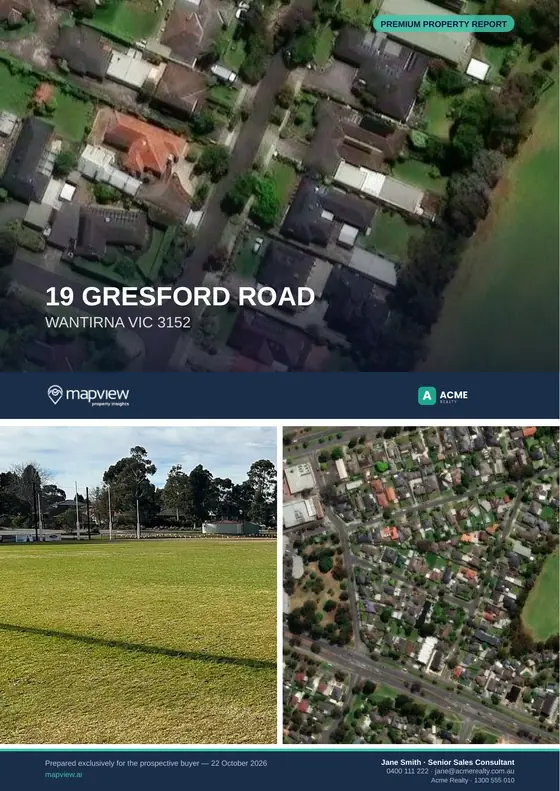
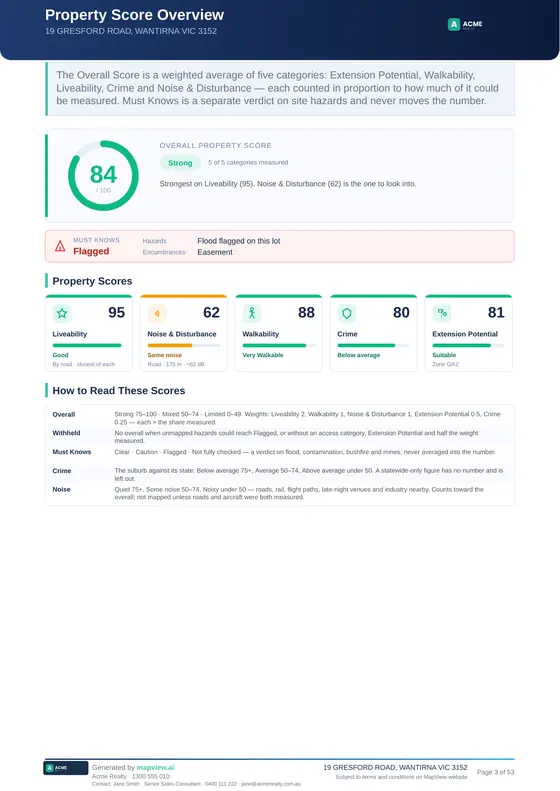
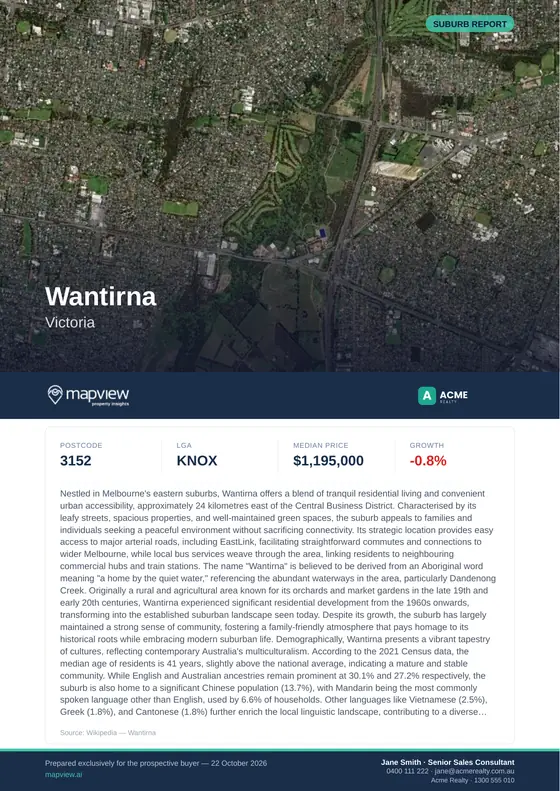
The cover
- Aerial imagery of the property or suburb fills the top, with the address or suburb name over it.
- The report name is in a teal label in the top corner, for example “Premium Property Report” or “Suburb Report”.
- Below the imagery, a navy band carries the MapView logo on the left and your logo on the right.
- The left of the bottom bar reads “Prepared exclusively for …” with the date and mapview.ai.
- The right of the bottom bar shows your contact person and strapline, in up to three lines:
Jane Smith · Senior Sales Consultant
0400 111 222 · jane@acme.example
Acme Realty · 1300 555 010
Interior pages
- A navy header carries the page title, the address and your logo.
- The footer carries:
- your logo
- “Generated by mapview.ai”
- your strapline
- one contact line:
Contact: Jane Smith · Senior Sales Consultant · 0400 111 222 · jane@acme.example - the address, MapView’s terms and the page number.
- The full-page section dividers, such as “01 Site Information”, carry MapView’s footer only.
Length. The sample property report runs to 53 pages and the suburb report to 18. The length varies with how much data there is for the address or suburb.
If your branding can’t be applied, the report is still produced as a standard MapView report, with brandingApplied: false.
Building a user interface
These flows suit a CRM screen or an internal tool.
Property report
- The user enters an address, and a unit if there is one.
- Your backend calls
resolve. - On a
422withcandidates, show a pick list and send the chosen candidate back throughresolve. - Show the canonical address and unit so the user can confirm them.
- Create the report with a new
Idempotency-Key. - Show progress while the report is
queuedorgenerating, and poll with backoff. - When it’s
ready, offer View and Download through your backend. Label reports withbrandingApplied: falseas “Standard MapView report”. - When it has
failed, showerror.messageand the report ID, and offer a retry with a new key.
Suburb report
Ask for the suburb, state and postcode. Require a region when the state is QLD. Then follow steps 5 to 8 above.
After a reload
Use GET /reports?externalReference=... and GET /reports/:id. Don’t rely on webhooks in the browser.
Usage
Show used / monthlyQuota and refresh it after each report. On a 429, explain that the quota is used up and use Retry-After to say when it resets.
Checklist
- The
mv_live_key exists only in your server’s secret storage. - Addresses are resolved and confirmed before reports are created.
- Every
422withcandidatesis handled without losing what the user typed. - Queensland suburb reports ask for a region.
- Each submission has its own
Idempotency-Key, and deliberate retries get a new one. - Polling backs off and stops at
readyorfailed. - PDFs are fetched through your backend.
brandingApplied: falseis shown as a standard report, not an error.- The quota and
429states are handled. - Webhook signatures are verified against the raw body, and duplicates are ignored.
Support
When you report an integration problem, include:
- the report ID or
externalReference - the
reportTypeand the request body (address or suburb, and region) - the HTTP status, and the
errorandmessagefrom the response - the
brandingAppliedvalue - whether the PDF came from the PDF endpoint or from
reportUrl - for a webhook problem, the
x-mapview-deliveryID and event.
Never send your API key or webhook secret to anyone, including MapView support.
Contact: hello@mapview.ai