For business

MapView reports, with your name on the cover.

Give clients a clear, independent property or suburb report, branded with your logo and contact details. It’s free. Create them in the partner portal, or straight from your CRM.

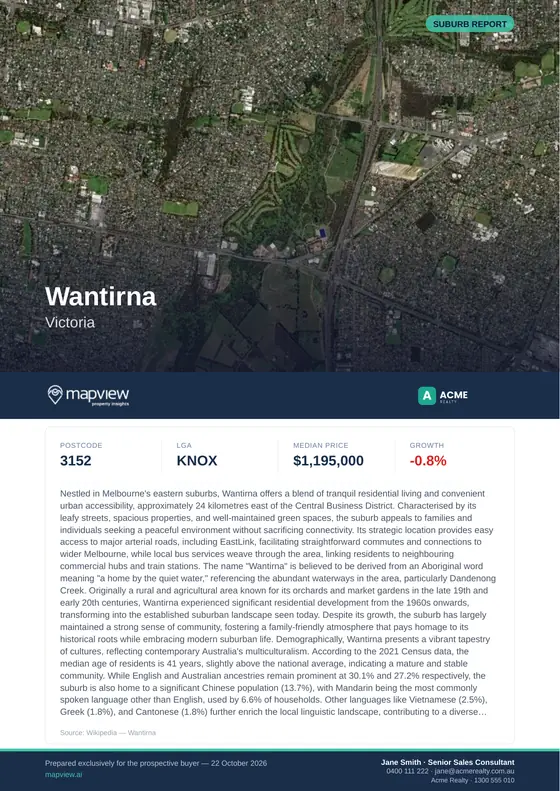
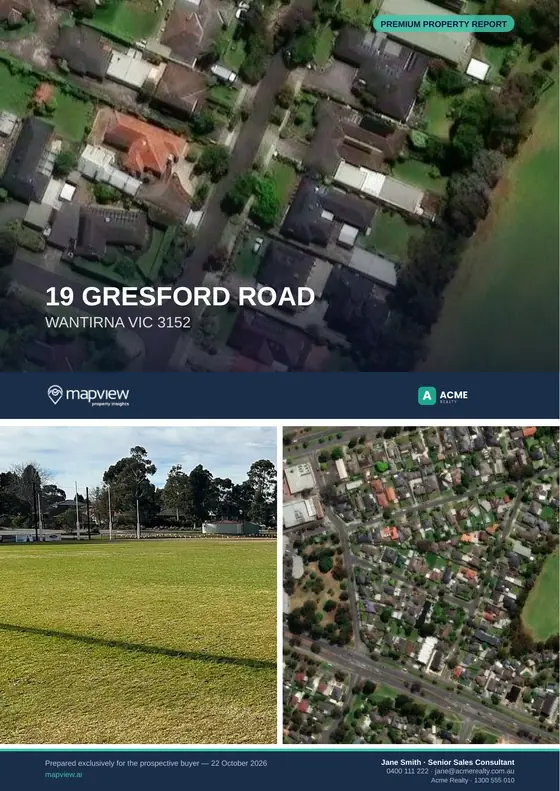
Cover of a sample MapView suburb report for Wantirna VIC, with the Acme Realty logo beside the MapView logo. Cover of a sample MapView property report for 19 Gresford Road, Wantirna: an aerial photo, the MapView and Acme Realty logos, and Jane Smith's contact details in the bottom bar.
Sample reports for Acme Realty, a demo partner. Your logo and contact go where theirs are.

Who it’s for

For anyone who helps people buy a home.

  • Real estate agents

    Bring an independent property report to appraisals and listing presentations, and give buyers one at the open home, with your details on every page.

  • Buyer's agents

    Brief clients on a shortlist with the same checks for every home: planning, zoning, permits nearby and what it sold for last time.

  • Mortgage brokers

    Add a property or suburb report to a client file, so the conversation starts with the facts about the place they want to buy.

  • Conveyancers and property lawyers

    Open a matter with the land size, zoning, planning rules and sales history in one document, under your firm’s name.

What’s in a report

Two reports, both under your name.

Property report

Everything about one address

For any address in Australia, checked against the national address register before it’s made.

  • A Property Score out of 100, and a Must Knows check for flood, bushfire, contamination and mine subsidence
  • Title information: lot and plan, tenure and easements
  • Planning zones and overlays, including heritage, flood and bushfire
  • A site plan with boundary dimensions, aerial imagery and topography
  • Sales and rental history, and nearby homes for sale and rent
  • Planning permits nearby, mapped and listed
  • School catchments, transport, distances, utilities and NBN
  • Suburb market data, demographics and crime
  • A due diligence checklist, and a page for notes

Suburb report

The bigger picture

For any suburb, in every state and territory. Useful for campaigns, newsletters and first meetings.

  • The suburb’s history and character
  • Census demographics: ages, families, homes, income and work
  • The mix of planning zones
  • Median sale prices and rents, year by year
  • Recent sales and listings
  • A rental market snapshot and auction results
  • Planning permits nearby
  • A suburb boundary map

Look inside the samples

Get both sample PDFs →

Property report

Sample: 19 Gresford Road, Wantirna VIC · 53 pages

  • Cover: your logo beside MapView’s, your contact in the bottom bar

  • Contents: overview, site, maps, planning, suburb and market, due diligence

  • Property Score out of 100, with the Must Knows verdict

  • What each score is built from, check by check

  • Site plan with boundary dimensions on aerial imagery

  • Planning permits nearby, mapped and listed

Suburb report

Sample: Wantirna VIC 3152 · 18 pages

  • Cover with the suburb’s median price and growth

  • Contents: history, census, zoning, sales, rentals, permits

  • Census demographics, from age to family make-up

  • The mix of planning zones across the suburb

  • Median sale prices and rents, year by year

Your branding

Your logo and contact, on every page.

Clients keep a good report and pass it on. Every page they share carries your name and the person to call.

  1. The cover. Your logo beside MapView’s, with your contact person, phone, email and strapline in the bottom bar.
  2. Every page header. Your logo at the top of each inside page.
  3. Every footer. Your logo, strapline and a contact line, next to “Generated by mapview.ai”.
  4. Independent data. MapView attribution stays on every page, so clients can see where the information comes from.

Two ways to create them

No code, or your own systems.

Partner portal

Your team signs in, types the address, confirms it and clicks create. The PDF is ready in about a minute.

  • Address suggestions, then a check against the national register
  • Property and suburb reports
  • Every report kept, searchable by your reference
  • This month’s usage at a glance

API

Create reports from your CRM, listing platform or app, and attach the PDFs to the right record automatically.

  • Address resolution against G-NAF
  • Signed webhooks when a report is ready
  • Safe retries with idempotency keys
  • Your own reference on every report
Read the API documentation →

Getting started

Set up in four steps.

  1. Sign up free

    Tell us your business name and work email, online or with the form below.

  2. Get your API key

    Confirm your email and your key is ready, or we set up the partner portal for your team.

  3. Add your branding

    Upload your logo and choose the name and contact person to show on every report.

  4. Make reports

    From your CRM or app through the API, or in the partner portal. Check a test report first.

Free. Co-branded reports cost nothing. Each account has a monthly report allowance, and reports that fail aren’t counted. Need more? Talk to us.

Questions

Good to know.

Is it the same information as the MapView app?

Yes. A co-branded report uses the same MapView data that the free app shows, put into one easy-to-read PDF, with your logo and contact details added.

Can we see a full sample?

Yes. Send the enquiry form and you can download a complete sample property report and suburb report straight away. They were made for Acme Realty, a demo partner, so you can see exactly where your branding would go.

How long does a report take?

A property report usually takes under a minute, and a suburb report up to about two minutes. In the portal you can leave the page and come back; the report will be waiting.

Where does our branding appear?

Your logo appears on the cover beside the MapView logo, at the top of the inside pages and in every footer. The cover and every footer also show your display name, a short strapline and your contact person (name, title, phone and email). MapView attribution stays in every footer.

What do you need for our logo?

A PNG, JPEG or WebP file up to 2 MB. A transparent PNG at least 400 pixels tall, in a horizontal layout, gives the best result. We can’t use SVG files.

Can each agent have their own contact details?

Each account has one contact person shown on its reports. If you’d like reports to show different people, tell us when you enquire and we’ll talk through the options.

Which areas are covered?

Property reports cover addresses across Australia, checked against the national address register (G-NAF). Suburb reports cover every state and territory; Queensland suburbs are grouped by region.

Can we connect it to our CRM?

Yes. The Co-branded Reports API lets your systems create reports, track them and download the PDFs. The API documentation covers authentication, webhooks and error handling.

Is it really free?

Yes. Co-branded reports cost nothing. Each account has a monthly report allowance, and reports that fail aren’t counted against it. If you need more, talk to us.

Is a report legal or financial advice?

No. A MapView report is general information to help people ask better questions. It doesn’t replace official certificates, searches or professional advice.


Talk to us

Put your name on MapView reports.

Tell us a little about your business. You’ll get both sample reports straight away, and we’ll be in touch within one or two business days to get you set up.

Already set up? Sign in to the partner portal.

How would you create reports?

We’ll only use these details to reply to you. See our Privacy Policy.