

Radar
See what's changing around any property.
Radar puts every listing, rental, sale and planning application within 100 m, 500 m or 1 km of an address on one map. Save the property and turn its Radar on, and MapView tells you as new ones are found.
In the app
Everything nearby, on one map.
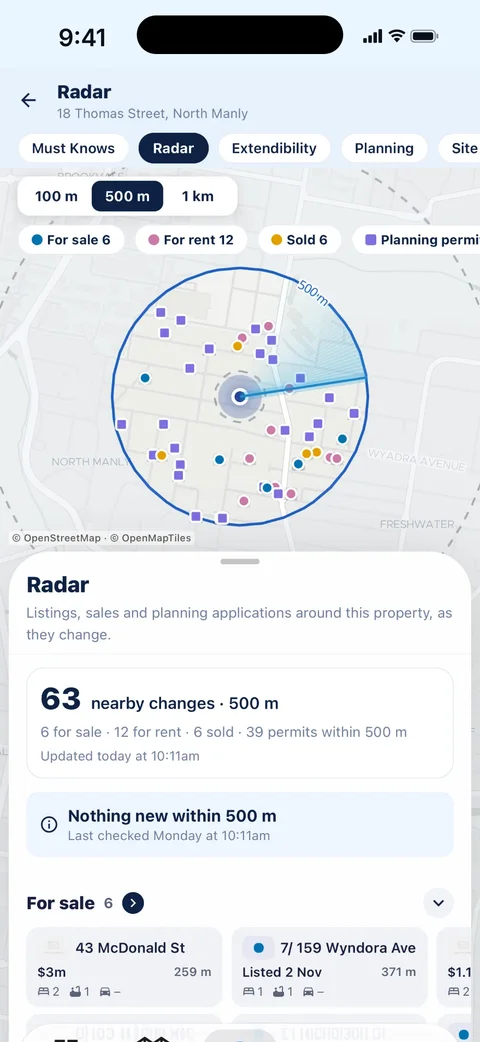
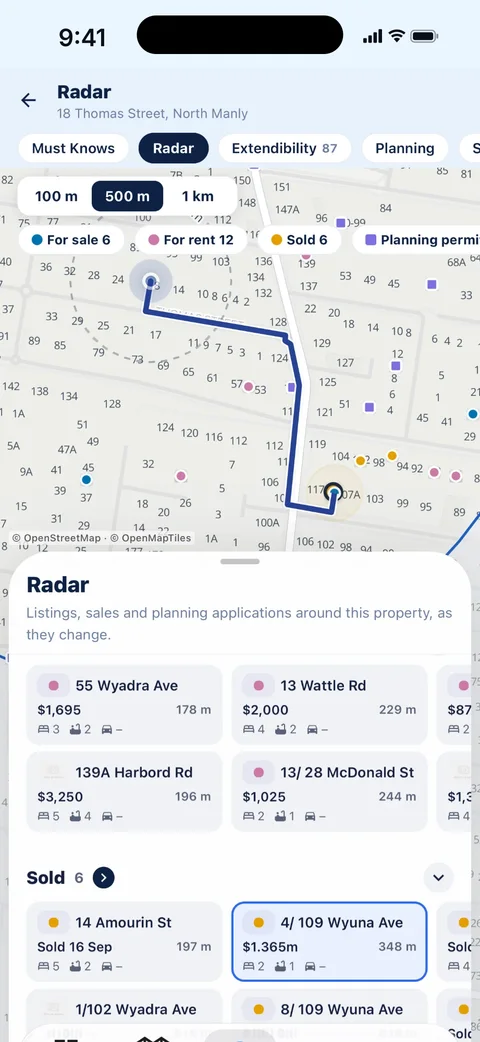
At 18 Thomas Street, North Manly, Radar finds 63 nearby changes within 500 m: 6 for sale, 12 for rent, 6 sold and 39 planning permits. Each group is a row of tiles you swipe through: the price, the rooms, parking and how far away it is. Pick one and the map shows the way there.
- For sale Homes newly listed for sale around the property, with the price, bedrooms, bathrooms, parking and distance.
- For rent Homes newly listed for rent nearby: the weekly rent, the rooms and how far away each one is.
- Sold Homes nearby that have sold, with the price where it is recorded. Useful before you make an offer.
- Planning permits Planning applications lodged around the property, with their status: approved, in progress, refused or not specified.
How alerts work
Off until you turn it on.
-
Open Radar on any property
Every property card has Radar up top. Choose 100 m, 500 m or 1 km, and switch kinds on or off. Radar counts what has changed over the last 7 days.
-
Save it to Watch or Manage
Watch is for homes you are thinking about. Manage is for the homes you own. Saving a property does not turn its alerts on.
-
Turn its Radar on
In Alert Settings, pick what you want to hear about for that property. Radar checks around it and sends each new item as it is found, between 7 am and 9 pm. Anything found overnight waits until morning.
| Watch | Manage | |
|---|---|---|
| New listings for sale nearby | Yes | Yes |
| New rentals nearby | Yes | Yes |
| Sales nearby | Yes | Yes |
| New planning permits nearby | No | Yes |
| Smoke alarm reminder | No | Yes |
Sent as they're found, 7 am to 9 pm. Off until you turn it on in Alert Settings.
Try it
Turn things on and off, and watch it work.
Pick a ring and switch each kind on or off. As the sweep passes something new inside the ring, an alert lands on the phone.
Alert Settings · Manage · 46 Mornington Tce, Robina
2 for sale · 1 for rent · 1 sold · 6 permits within 500 m
Off until you turn it on · Sent as they're found, 7 am to 9 pm
Questions
About Radar.
What is Radar in MapView?
Radar shows everything listed for sale, listed for rent, sold and applied for in planning around a property, within 100 m, 500 m or 1 km, on one map. It counts what has changed over the last 7 days, and each item shows its price, rooms and distance.
Does Radar send me notifications?
Only if you turn it on. Save the property to Watch or Manage, then turn its Radar on in Alert Settings. New items are sent as they're found, between 7 am and 9 pm. Radar is off until you turn it on, and saving a property doesn't switch it on.
What is the difference between Watch and Manage?
Watch is for homes you are looking at: its Radar covers new listings, rentals and sales nearby. Manage is for homes you own: it adds new planning permits nearby and the smoke alarm reminder.
Do I need an account for Radar?
Yes. The app is free to download and look up any address, and Radar needs a free MapView account so it knows which properties to watch for you.
Where does Radar get its information?
Listings, rentals and sales come from property listing data, and planning applications come from council and state planning records. Coverage of planning permits varies by council; where an area is not covered, the app says so rather than showing zero.


